
Shopify AI Agent Readiness Audit: 6 Checks in 10 Minutes
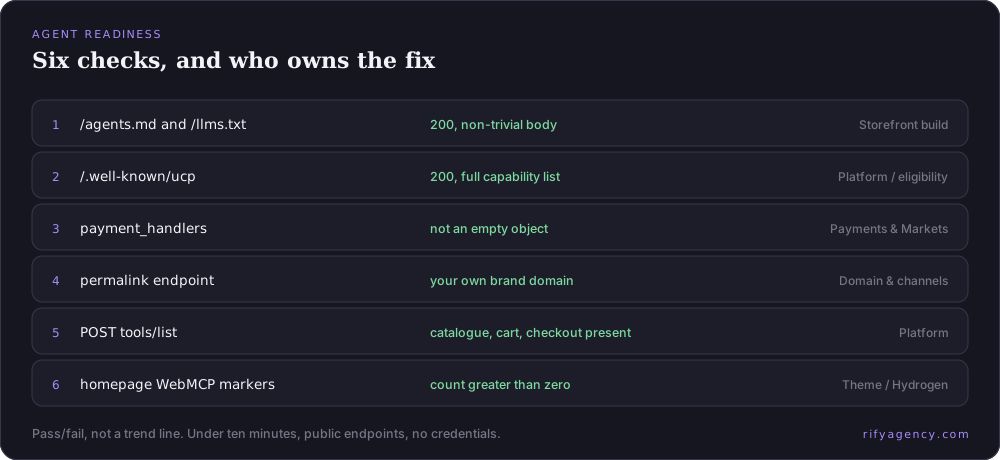
Six public endpoints tell you whether AI shopping agents can find, read and buy from your Shopify store. No API keys, no admin access, no tooling. Here are the checks, the healthy baseline for each, and who on your team owns the fix.
Agentic Commerce Shopify Platform
Why a boolean audit beats a dashboard
AI agent readiness does not decay gradually the way rankings do. A tool call either returns your products or returns nothing. A checkout either completes in the conversation or it does not. There is no middle state and no partial credit, which makes this a pass/fail checklist rather than a trend line.
That is good news operationally: the audit is fast, cheap and repeatable, and most failures are configuration rather than engineering. Everything below uses publicly readable endpoints on your own domain. Replace yourstore.com with your domain and run it now.
Check 1 — /agents.md and /llms.txt return 200
Eligible Shopify stores host a platform-generated manual for AI agents at /agents.md, and mirror it at /llms.txt. Request headers for both and confirm a 200.
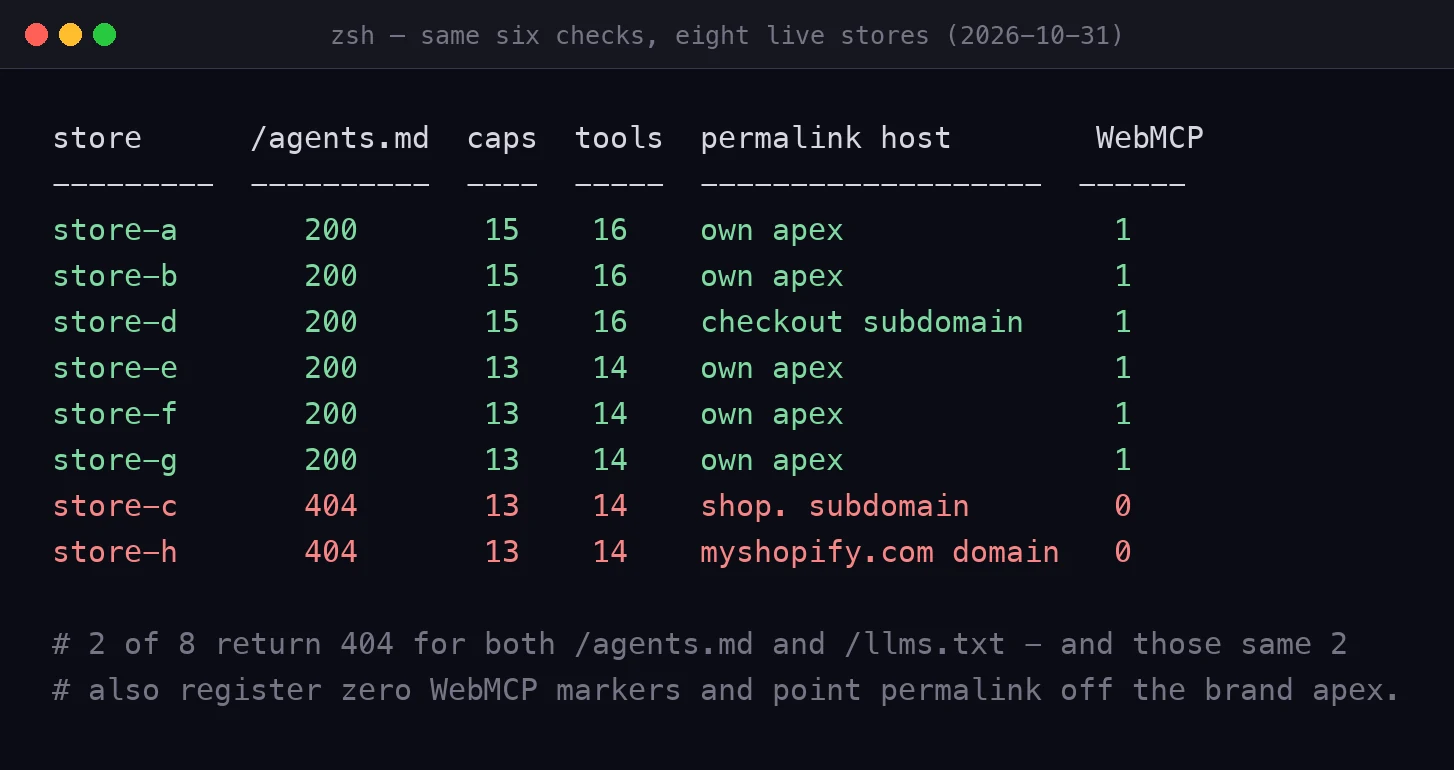
Healthy baseline: both return 200 with a non-trivial body — typically around 5.6 to 5.8 KB. Across eight live storefronts we checked on 2026-10-31, six served both files and two returned 404 for both. Owner: whoever controls your storefront build — theme team for Liquid, front-end engineering for headless.
Check 2 — /.well-known/ucp exists and declares real capabilities
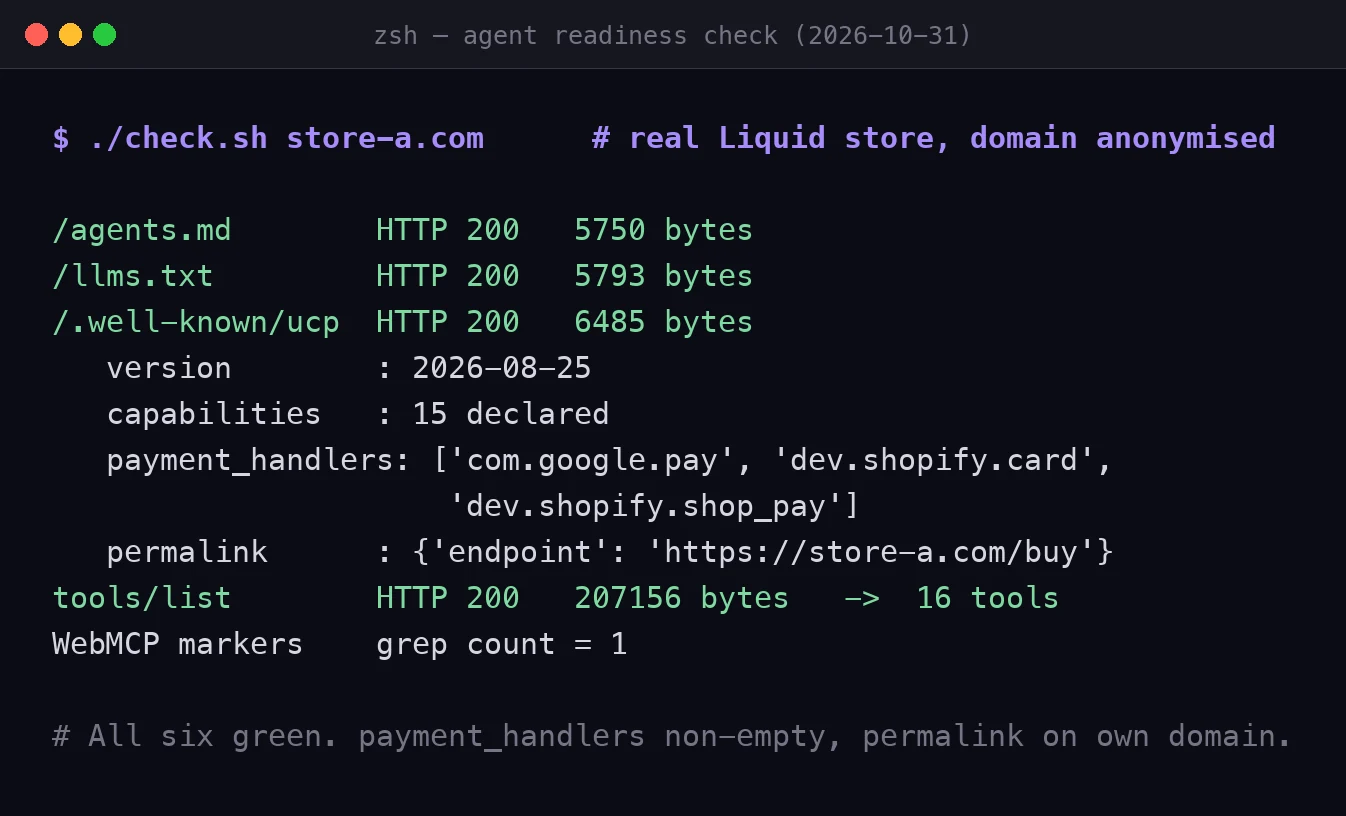
Fetch https://yourstore.com/.well-known/ucp. This is the protocol discovery document: negotiated version, service endpoints, declared capabilities and payment handlers.
Healthy baseline: a 200 response declaring a full capability list. On 2026-10-31 the eight stores we checked declared either 13 or 15 capabilities; the extra two on the larger set were store-location search and lookup, which only brands with physical stores carry. All eight had negotiated the same dated protocol version. A list materially shorter than that — particularly one missing an entire capability family — is worth escalating. Owner: usually the platform, but a thin list on a custom domain points at your own storefront configuration.
Check 3 — payment_handlers is not empty
Inside that same document, look at the declared payment handlers. This is the single most commonly broken field we see, and the least commonly checked.
Healthy baseline: at least one fully declared handler. All eight stores we checked on 2026-10-31 passed this, typically declaring Google Pay alongside Shopify's own card and Shop Pay handlers — so expect a pass. It stays on the list because an empty object means there is no usable payment rail for your store on that agent checkout path, regardless of how good your catalogue looks, and nothing else in your reporting would tell you. Owner: payments and Markets configuration, not the theme team.
Check 4 — the permalink capability points at your own domain
Still in the discovery document: find the permalink capability and check which host its endpoint resolves to.
Healthy baseline: your own brand domain. Two of the eight stores we checked on 2026-10-31 failed this — one resolving to a myshopify domain, one to a separate shop subdomain — and both were also the two that failed checks 1 and 6. A regional checkout subdomain is a deliberate configuration rather than a fault, so read the value before you escalate. Owner: domain and sales channel configuration.
Check 5 — your MCP endpoint lists tools
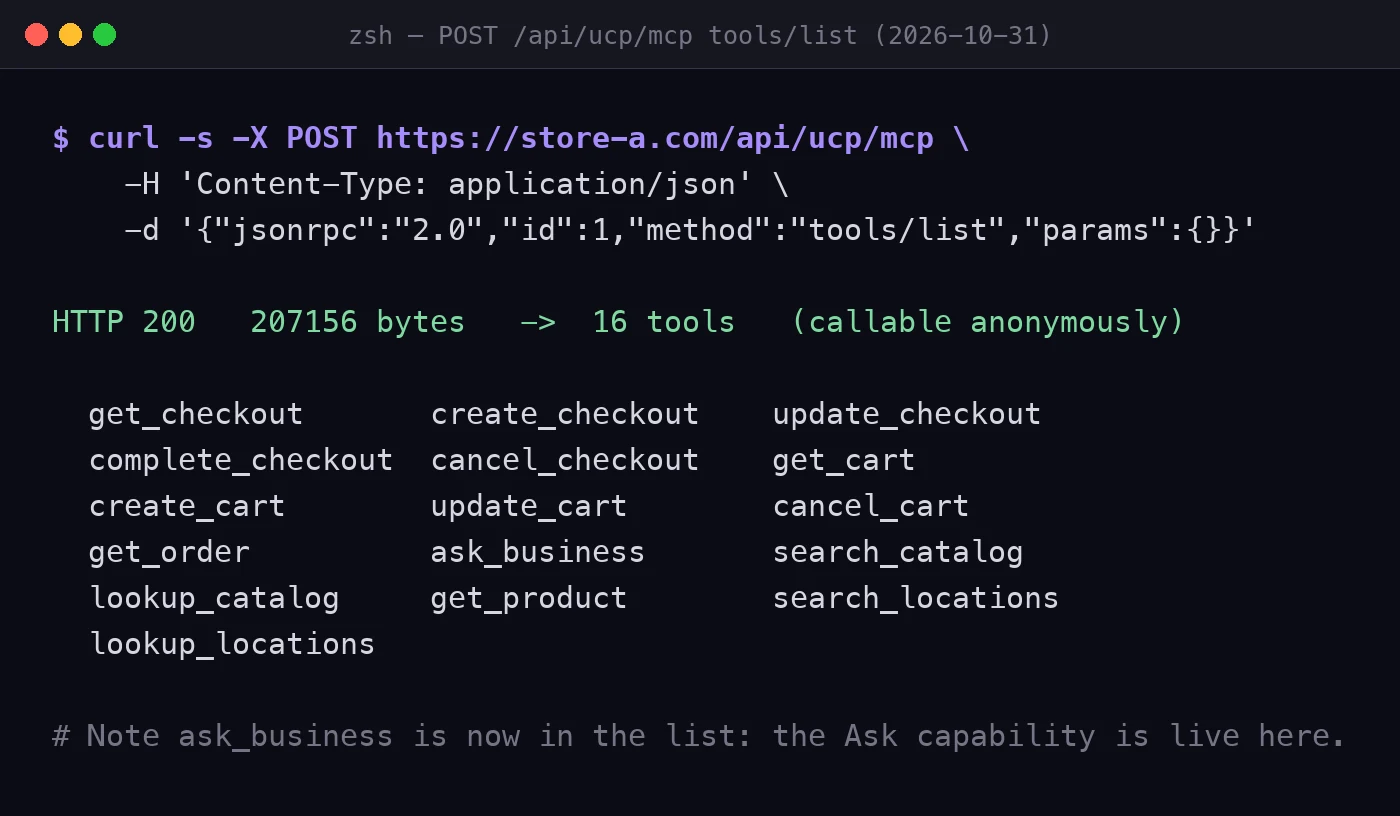
POST a standard JSON-RPC tools/list request to https://yourstore.com/api/ucp/mcp. In our 2026-10-31 run this listing was callable anonymously on all eight stores and returned a 207 KB payload describing either 14 or 16 tools, spanning catalogue, cart, checkout, order and — on stores with physical locations — location groups.
Healthy baseline: a tool list in that range, including catalogue search, cart operations and checkout. Note the deliberate design here: the listing is public, but actually executing a catalogue search requires a publicly reachable agent identity profile — with an unreachable profile the call fails with a profile-unreachable error rather than degrading to a worse result. The list being open does not mean the store is open. Owner: platform, with escalation if the endpoint is absent entirely.
Check 6 — your storefront registers WebMCP tools
Fetch your homepage HTML and count references to the browser model-context interface. Shopify registers a set of structured tools on Liquid storefronts, and on supported recent Hydrogen storefronts that render its script bundle, so browser-resident agents can call tools instead of parsing screenshots.
Healthy baseline: a non-zero count. On 2026-10-31, six of the eight stores we checked registered these markers and two returned zero — and the two that returned zero were the same two that failed checks 1 and 4. An in-browser agent on those sites has no structured tools to call. Owner: theme team for Liquid; for headless, your Hydrogen version and script initialisation.
Scoring and what to do with the result
- Six green — you are structurally present. Move on to catalogue quality: standard product category, filterable attributes, in-stock hygiene, extractable product facts, published policy facts.
- Checks 1 or 6 red — storefront build issue. Most common on headless and custom-domain setups. Fix before any content work.
- Check 3 or 4 red — payments, Markets or domain configuration. Usually a same-day fix with disproportionate impact.
- Checks 2 or 5 red — escalate; an entirely absent protocol surface normally indicates an eligibility or channel publication problem.
- Re-run quarterly at minimum. Protocol versions and capability lists drift, and a passing result in October is not evidence of a passing result in January.
If you would rather not run it yourself
The six checks are deliberately simple so any team can do them. The harder part is interpretation: which of the two catalogues your category competes in, which filter dimensions you are failing, whether your product copy yields extractable facts, and what order to fix things in given your roadmap.
That interpretation is the first deliverable of our AI Visibility (GEO/AEO) and Agentic Commerce engagements, and it is also where most of the value sits. If you want a read on your own domain — including what agents currently retrieve for your core category terms — send it over and we will walk you through the findings.
Common questions
Do I need admin access or an API key to run this audit?
No. All six checks use endpoints that are publicly readable on your own domain. You will need admin access to fix several of the failures, but not to detect them.
My store is headless. Should I expect to fail?
Not necessarily, but you should check rather than assume. Headless turns several things that were default-on into things you must actively verify. In our 2026-10-31 run the two stores that failed did so on three checks at once — agent manual, permalink destination and browser-side tool markers — which is why we now recommend adding all of them to every migration acceptance checklist.
How often should this be re-run?
Quarterly as a floor, and immediately after any storefront migration, theme replatform, domain change, payment provider change or Markets reconfiguration — those are the events that silently break checks 3, 4 and 6.
What is the single highest-impact fix?
In our sample it was the storefront build failures — a 404 on /agents.md and /llms.txt, plus zero browser-side tool markers. They travel together, they remove the entry points entirely, and they are the cheapest to fix once somebody actually looks.
More reading
 Shopify Editions Fall '26: The Updates That Change Acquisition222 updates, 11 sections, and most coverage focused on the wrong ones. We read Shopify's own structured release data to find where the weight sits — and pulled out the nine updates that change how a brand gets found, chosen and measured.→
 Shopify GEO Strategy After Fall '26: Ranking to Being CalledEcommerce visibility now has three levels, not two: being indexed, being cited, and being callable. They stack rather than replace each other, their failure modes are completely different, and only one of them is a switch. Here is how to structure a GEO programme for a Shopify brand accordingly.→
 Your Analytics Undercounts Agentic Orders: How to Fix ItWhen a purchase completes inside an AI assistant, your thank-you page is never loaded, so every event bound to it silently stops firing. Revenue is fine. Reporting is not. Here is the system-by-system repair, and why this is the first project rather than the last.→
 Promoted Placement: Paid Rank Inside AI Shopping AnswersShopify's cross-store catalogue now blends paid placements into the ranked organic results an AI agent sees, with a commission attached and mandatory disclosure. This is the moment agentic commerce gets an advertising layer — and the line between paid and organic is blurry by design.→
Building something ambitious?
Tell us about your brand, goals and timeline — we'll come back with next steps.